What Is a Status Page and Why Your Users Need One
Your app goes down at 2 PM on a Tuesday. Within minutes, your inbox fills up.
"Is the site down?" "Are you aware of the issue?" "When will it be fixed?" "Hello?"
You're already debugging the problem. Now you're also managing a dozen conversations. Every reply is the same: yes, we know, we're working on it.
A status page eliminates that entire loop. Instead of answering the same question twenty times, you point to one URL that answers it for everyone.
What a Status Page Actually Is
A status page is a public webpage that shows the current state of your service. At its simplest, it answers one question: is it working right now?
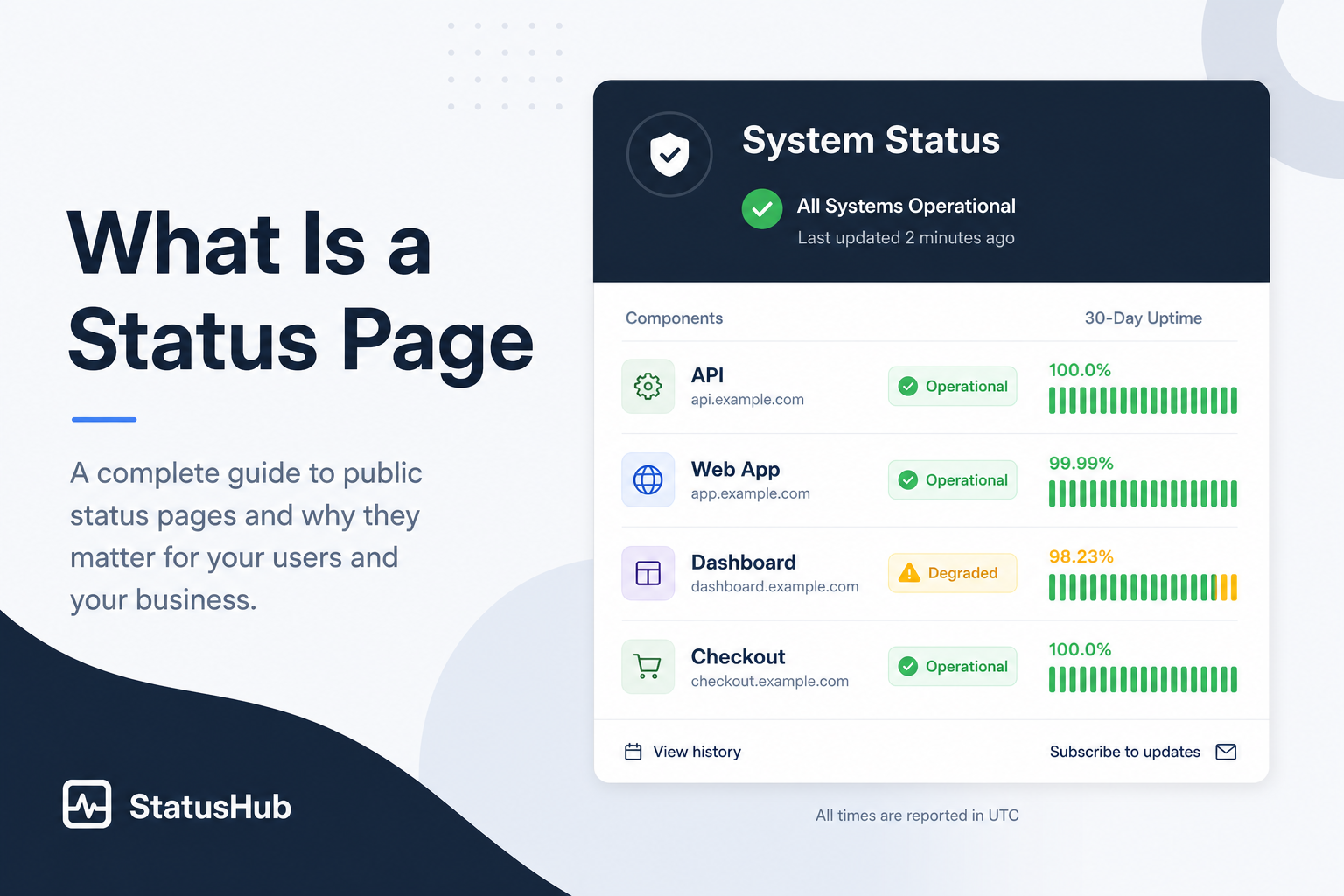
A typical status page shows:
- Components: Your key services listed individually — API, web app, dashboard, checkout
- Current status: Whether each component is operational, degraded, or experiencing an outage
- Uptime history: A visual bar showing the last 30 days of uptime for each component
- Active incidents: What's currently broken, when it started, and what you're doing about it
- Maintenance schedule: Planned downtime that users should know about
Your users don't need to understand your infrastructure. They need to know if the thing they're trying to use is working. A status page gives them that in five seconds.
Why Your Users Need One
It replaces "is it down?" support tickets
Every minute of downtime without a status page generates support load. Users can't tell whether the problem is on your end or theirs. So they email, they message, they tweet. A status page is a self-service answer to the most common support question during an outage.
It builds trust through transparency
Publishing your uptime data — including the bad days — signals confidence. It says: we track this, we take it seriously, and we're not hiding anything. Users trust products that acknowledge imperfection over products that pretend to be perfect.
The companies with the best reputations for reliability aren't the ones that never go down. They're the ones that communicate clearly when they do.
It reduces panic during outages
When users see a blank page or an error message, they don't know what's happening. Is it a five-minute blip or a catastrophic failure? Are you even aware? A status page with an active incident and regular updates answers all of that. It turns panic into patience.
It protects your brand during maintenance
Planned maintenance without a status page looks identical to an outage from the user's perspective. They see an error, they assume something broke. A status page with a scheduled maintenance notice reframes it: this is planned, it's temporary, and here's when it'll be done.
What Makes a Status Page Good
Not all status pages are useful. Here's what separates a helpful one from a forgettable one.
Separate from your main app. If your status page runs on the same infrastructure as your product, it goes down when your product goes down. Host it on a subdomain like status.yourdomain.com with independent infrastructure.
Updated automatically. A status page that shows "All Systems Operational" during an outage is worse than no status page at all. Automatic updates from your monitoring system ensure the page reflects reality, not someone's last manual update from three hours ago.
Simple and scannable. Your users are checking the status page because something feels broken. They want a yes-or-no answer in under five seconds. Component names should be clear, status indicators should be visual (green/red), and the overall state should be obvious at a glance.
Includes history. A status page that only shows current status misses half the value. A 30-day uptime bar for each component lets users assess your reliability over time, not just in this moment.
Shows maintenance windows. Scheduled downtime displayed on the status page prevents false alarm support tickets and shows users you plan ahead.
Who Needs a Status Page
If any of these apply to you, a status page adds value:
- You have paying customers who depend on your service being available
- You run a SaaS product where downtime directly affects your users' workflows
- You manage client sites and need a professional way to communicate uptime
- You offer an API that other products integrate with
- You're tired of answering "is it down?" during every outage
You don't need to be a large company. A solo developer with a handful of users benefits from a status page just as much — maybe more, because you don't have a support team to absorb the flood of "is it down?" messages.
How to Set One Up
The fastest path is to use your uptime monitoring tool's built-in status page. In Monitoristic, you can create a status page in under a minute:
- Pick which monitors appear on the page
- Choose a URL slug (or connect a custom domain like
status.yourdomain.com) - Share the link with your users
The page updates automatically based on your monitoring data. When a monitor detects downtime, the status page reflects it immediately. When you schedule maintenance, it shows on the page. No manual updates needed.
For a step-by-step walkthrough, see our guide on how to set up a public status page.
The Status Page You Ignore Is the One Your Users Need Most
Most founders don't think about status pages until their first major outage. By then, the damage is done — users are frustrated, support is overwhelmed, and trust takes a hit.
Setting one up takes less time than writing a single "sorry for the downtime" email. And unlike that email, it works automatically the next time something breaks.
Related Reading
- How to Set Up a Public Status Page — a step-by-step walkthrough
- What Happens When Your Website Goes Down — the anatomy of an outage
- How to Use Maintenance Windows — avoid false alarms during planned work
- Learn the terms: status page, incident, and maintenance window